Type of Game and Intro to PyGame
Subject: Game Design Development (VU-CSC 224)Understanding the difference between 2D and 3D games is important before students start building games with Pygame.
2D Games (Two-Dimensional Games):
2D games are games that operate in a flat environment using only two dimensions: width (X-axis) and height (Y-axis). This means that all characters, objects, and backgrounds appear on a single plane without any real sense of depth. In 2D games, developers typically use images called sprites to represent game elements, and movement is usually limited to up, down, left, and right directions.
Because of their simplicity, 2D games are easier to design, faster to develop, and require less computing power. This makes them ideal for beginners and widely used in education.
Characteristics
- Flat graphics, i.e width (X-axis) and height (Y-axis). (no real depth)
- Easier to design and develop
- Uses sprites (images) for characters and objects
- Faster performance (runs well on low-end systems)
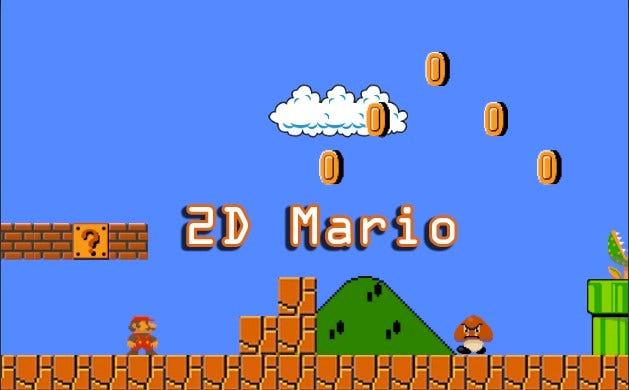
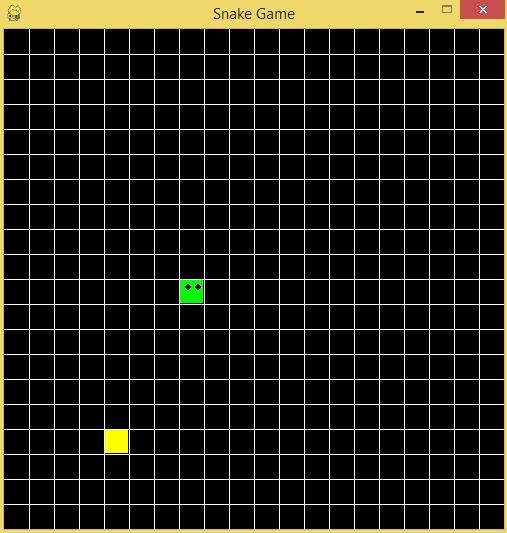
- Popular examples include Snake, Flappy Bird, and classic Mario games.
- Pygame is mainly used for building 2D games, making it perfect for beginners.
3D Games (Three-Dimensional Games)
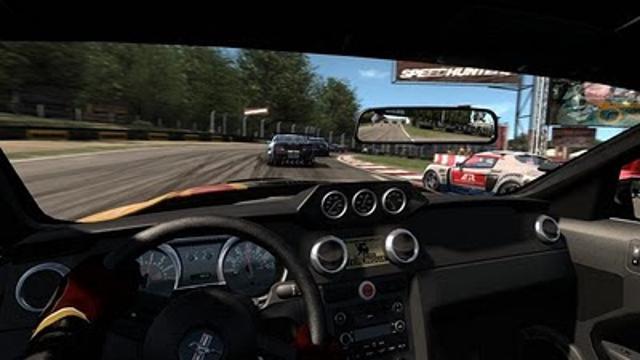
3D games, on the other hand, operate in a more complex environment that includes three dimensions: width (X-axis), height (Y-axis), and depth (Z-axis). This additional dimension gives objects a sense of volume and allows for realistic environments, camera angles, and perspectives. In 3D games, players can move not just side-to-side or up-and-down, but also forward and backward, creating a more immersive experience.
However, this realism comes with increased complexity, as developers must handle lighting, textures, physics, and camera systems. 3D game development typically requires more advanced tools such as Unity or Unreal Engine and more powerful hardware.
Characteristics
- Realistic environments
- Objects have depth and volume i.e width (X), height (Y), and depth (Z)
- More complex to build
- Requires more powerful hardware
- Examples of 3D games include FIFA, Call of Duty, and Grand Theft Auto.
- Tools for 3D Games includes Unity, Unreal Engine and Blender (for modeling)
Introduction to Pygame
Pygame is a free, open-source library of Python modules designed specifically for game development. Built on the SDL (Simple DirectMedia Layer) framework, it provides essential tools for handling graphics, sound, and user input, making it possible to create fully interactive 2D games and multimedia applications using Python.
As a beginner-friendly and cross-platform library, Pygame is widely used in education and hobbyist projects. It offers built-in support for graphics rendering, sound playback, input handling, and collision detection, allowing developers to focus on creativity and game logic while leveraging a simple and accessible programming environment.
Key Features of Pygame
1. Easy to Learn and Use: pygame is designed with beginners in mind. Its simple structure and Python-based syntax make it easy for new programmers and students to start building games quickly.
2. Cross-Platform Support: games built with Pygame can run on multiple operating systems such as Windows, macOS, and Linux without major changes.
3. 2D Graphics Rendering: pygame provides tools for drawing shapes, images, and animations, allowing developers to create rich 2D game environments.
4. Sound and Music Support: it includes modules for playing sound effects and background music, enhancing the overall gaming experience.
5. Input Handling: pygame supports keyboard, mouse, and joystick input, making it easy to interact with the game.
6. Collision Detection: built-in support for detecting collisions between objects (like sprites) simplifies game logic, especially in action and arcade games.
7. Sprite Management: pygame includes a sprite module that helps organize game objects, making it easier to manage animations and interactions.
8. Open Source and Free: being open-source, Pygame is freely available and supported by a large community of developers and educators.
9. Suitable for Education: pygame is widely used in schools and training programs to teach programming, game development, and problem-solving skills.
10. Extensible and Flexible: developers can integrate Pygame with other Python libraries, allowing for more advanced features and customization.
Mario 2D
Snake 2D
3D Game
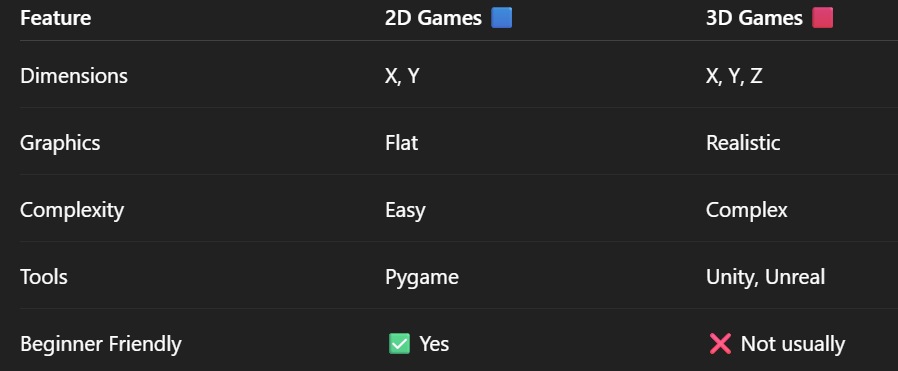
2D vs 3D
By: Vision University
Comments
No Comment yet!
Login to comment or ask question on this topic
Previous Topic Next Topic