Home > Courses > Introduction to HTML and Web Technology > Break Line, paragraph, Align and Headings
Break Line, paragraph, Align and Headings
Subject: Introduction to HTML and Web Technology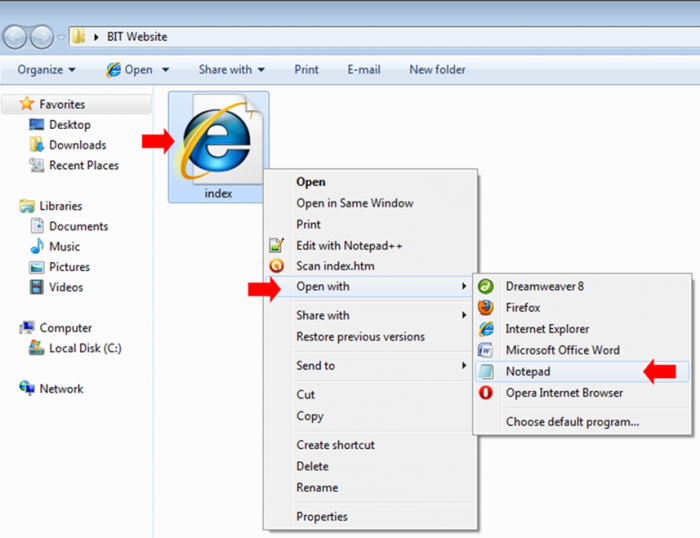 If you have completed lesson two you may be wondering how can you make a text to continue from another line, add a paragraph, alighn text to the center or make a text bigger. All these will be dicussed in this lesson three.
First let us learn how to edit the web page we had created in lesson one, please follow this simple steps:
Editing the webpage
Follow the step below to do this:
STEP1. Right click on the webpage
STEP2. Point to "Open With" from the menu list
STEP3. Then click "Notepad" from the sub-menu
(Note If Notepad can not be found in the sub-menu)
STEP3. Then click "Choose Program..." on the sub-menu
STEP4. When the "Open With" dialogue box appear
STEP5. Click Notepad from the list of Programs.
Finally our page is in editing mode, using Notepad.
Now let us get started...
Break:
<br/>Paragraphs: Paragraphs are represented by the
<p>Paragraph align:
<p align="center">This text will be move to center</p>Headings: HTML provides six levels of headings, from
<h1> to <h6>
<h1>This is Heading 1</h1>
<h2>This is Heading 2</h2>
<!-- ... up to h6 -->
Lets us see some sample:
<html>
 <head>
 <title> TEA Learn Learning Management System </title>
 </head>
 <body>
 <p align="center">
 TEA Learn empowers you with technology skills, expand your knowledge with quality education and enable you explore your curiosity with creative art.
 <p/>

<h4>WHY TEA LEARN?</h4>
Personalized learning <br/>
Quality Content <br/>
Empower Educators <br/>

</body>
</html>
You will notice that the paragraph tag is equivalent to two break lines, the paragraph tag also have some interesting attribute, such aligning text (not limited to text but any object in-betweens its tags, such as images or table) to three main position (left, center or right), let’s take a look...
Align to centre
<p align="center"> this text will appear at the centre of the screen </p>Align to right
<p align="right"> this text will appear at the right of the screen </p>Align to left
<p align="left"> This text will appear at the left of the screen </p>By: Benjamin Onuorah
Comments
Abah Johnson (learner)Date commented: 12-Mar-2024 07:56:31am
Welcome to BabaJay Accessories
Get ready to turn heads! We're your one-stop shop for the latest fashion finds that push boundaries and express your unique style.
Favour Goodnews (learner)
Date commented: 03-Jan-2026 03:20:35pm
Vision
University
Login to comment or ask question on this topic
Previous Topic Next Topic
- 1 Introduction to Web Technology
- 2 Getting Started with HTML
- 3 Break Line, paragraph, Align and Headings
- 4 Formatting and Listing
- 5 Add Image to web page
- 6 HTML Table
- 7 HTML Forms
- 8 HTML Links