HTML Forms
Subject: Introduction to HTML and Web Technology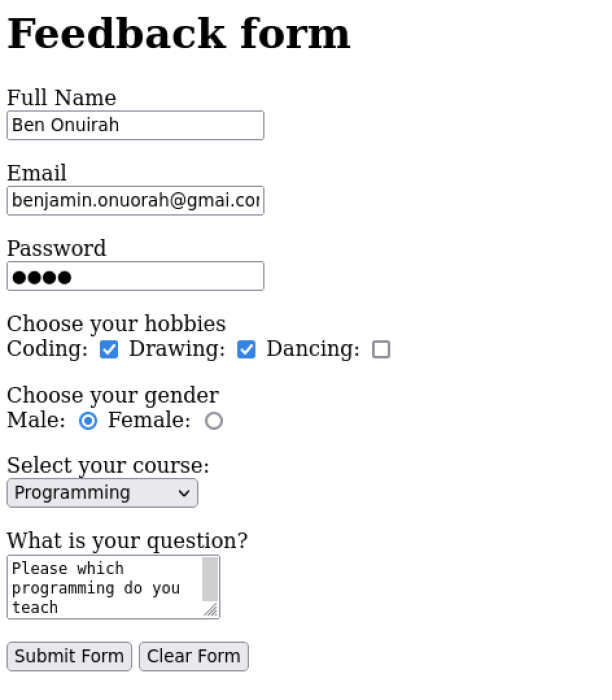 An HTML form is a fundamental component of web pages that allows users to input and submit data to a web server for processing. It consists of various elements, such as text fields, checkboxes, radio buttons, and buttons, which enable users to provide information or make selections.
Here's a brief explanation of the key components and attributes of an HTML form:
<form method="..." action="..." >...<form>.1. form element: This is the core element that defines the form. It typically includes the following attributes:
action: Specifies the URL where the form data will be sent for processing.
method: Defines the HTTP method to be used for submitting the form data, usually "GET" or "POST."
2. Input fields: Input fields allow users to enter data. Common input types include:
<input type="text"> for text input.
<input type="password"> for password input.
<input type="checkbox"> for checkboxes. This allow you to pick MORE THAN ONE option. e.g Hobbies: coding, drawing, dancing, singing.
<input type="radio"> for radio buttons. This allow you to pick ONLY ONE option. e.g Gender: male, female
<select> for dropdown menus.
<textarea> for multiline text input.
3. Buttons: You can include buttons to submit or reset the form.
<input type="submit"> for submitting the form data.
<input type="reset"> for resetting the form to its initial state.
4. Labels: Labels are used to describe input fields to users. They improve accessibility and user experience.
Example of a Feedback form
<h1>Feedback form</h1>
<form method="post" action="contact_process.php">

<p>
    <label>Full Name</label>
    <br/>
    <input type="text" name="student_fullname">
<p/>

<p>
    <label>Email</label>
    <br/>
    <input type="email" name="student_email">
<p/>

<p>
    <label>Password</label>
    <br/>
    <input type="password" name="student_pw">
<p/>

<p>
    <label>Choose your hobbies</label>
    <br/>
    Coding:
    <input type="checkbox" name="student_hubby" value="Coding">
    Drawing:
    <input type="checkbox" name="student_hubby" value="Drawing">
    Dancing:
    <input type="checkbox" name="student_hubby" value="Dancing">
<p/>

<p>
    <label>Choose your gender</label>
    <br/>
    Male:
    <input type="radio" name="student_gender" value="Male">
    Female:
    <input type="radio" name="student_gender" value="Female">
<p/>

<p>
    <label>Select your course:</label>
    <br/>
    <select name="course">
        <option>Data Science</option>
        <option>Web Design</option>
        <option>Programming</option>
        <option>Machine Learning</option>
    </select>
<p/>

<p>
    <label>What is your question?</label>
    <br/>
     <textarea name="question"></textarea>
<p/>

<p>
    <input type="submit" value="Submit Form">
    <input type="reset" value="Clear Form">
</p>

</form>
In summary, HTML forms are crucial for user interaction on websites. They provide a structured way to collect and submit data, enabling various online activities such as user registrations, search queries, and online shopping. Developers can use HTML, along with CSS and JavaScript, to create attractive and functional forms tailored to their specific needs.
By: Benjamin Onuorah
Comments
No Comment yet!
Login to comment or ask question on this topic
Previous Topic Next Topic